Showing posts with label Commerce Server. Show all posts

Wednesday, January 10, 2007

Commerce Server Environment Changes Troubleshooting

Recently I had to get all the webservers from my development enviroment to my client developmet environment and plug them into its network. In this cenario all changes, the Active directory, the Commerce Server databases, etc.

Unfortunately after reconfigure the IIS application pools identity and set the correct permission to the new administrators for this new AD, when I started the Commerce Server Manager it failed. Another similar behavior is to failed the snap-in.


Looking for this CSConfig options I had to run the : CSCONFIG.EXE /F to force the new configuration.

After thar the initian CS Configuration Wizard shows up.

If you had the configuration file for this enviroment you just have to load it, if not hit next.
Get the SQL Server name and instance (if you use it) for the MSCS_Admin. I my case my client changed the MSCS_Admin database name, this can cause problem if you are not alert for that. Make sure that you type the correct Admin Database name for this Commerce server environment.


Choose the correct authentication mode and hit next.


For this webservers I didn't install the Direct Mailer and CS Staging and this is all that I had to do. If you use Direct Mailer remember to configure the correct Direct Mailer user and database server because in this cenario you already have an enviroment running.


That's all, your webserver is now able to run.

Tuesday, November 21, 2006

BizTalk Commerce 2K7 Adapter Troubleshooting

Yesterday I receive an email with this error in the Biztalk Environment of my client.

"..Failed submitting message to BizTalk. Message: String was not recognized as a valid DateTime.."

The Biztalk Project, that throw an error, works to delivery Commerce Server Orders to a backoffice system. This error starts without a specific reason so I start to investigate.

First I execute the steps of Biztalk Adapters Troubleshooting, from Commerce Server Documentation (http://msdn2.microsoft.com/en-us/library/aa545867.aspx).

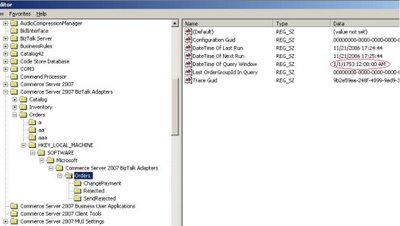
I find two occurrences : Abandoned Registry Entries and Last Run Times Written to the System Registry I verify the date changes to 1/1/1753.


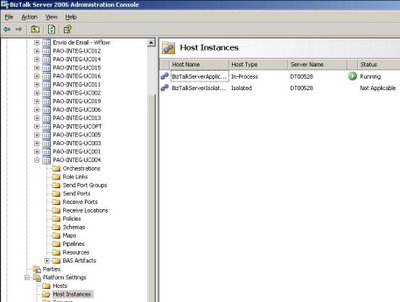
To fix it I backup the registry and change the date to the actual date. After that I delete the Biztalk Project, install the project again and restart the Biztalk Service (Platform Setting > Host Instances > BizTalkServerApplication).

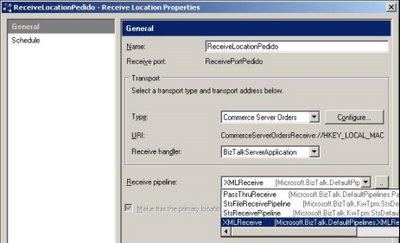
After that I check the receive locations and make sure that all Receive Pipeline are XMLReceive. (just because that make sense for this project).

The last check I did was the Regional Settings of the machine (Control Panel > Regional Language and Options), and I changed Portuguese(Brazil) to English (United States).

After that a simple reboot and the environment starts to run again.

See also the resume event :
Event Type: Error
Event Source: Commerce Server Orders Receive Adapter
Event Category: None
Event ID: 0

Description:
Failed submitting message to BizTalk. Message: String was not recognized as a valid DateTime.. Stack trace: at System.DateTimeParse.Parse(String s, DateTimeFormatInfo dtfi, DateTimeStyles styles)
at System.DateTime.Parse(String s, IFormatProvider provider)
at Microsoft.CommerceServer.Adapter.Orders.OrdersReceiveEndpoint.get_TimeWindow()
at Microsoft.CommerceServer.Adapter.Orders.OrdersReceiveEndpoint.SubmitBatch().

For more information, see Help and Support Center at http://go.microsoft.com/fwlink/events.asp.


Because of the untraceable nature of this kind of error I believe that type of things we will get resolved in the first Commerce 2k7 SP1.

Good Luck!

Commerce Server Webcasts

A good way to start (or migrate) to a new product is watching an Web Cast. I always look for this to get my first impression or to get more details about specific areas.

Se also the Microsoft Commerce Server Webcasts on TechNet :
http://www.microsoft.com/technet/prodtechnol/comm/2007/webcasts.mspx